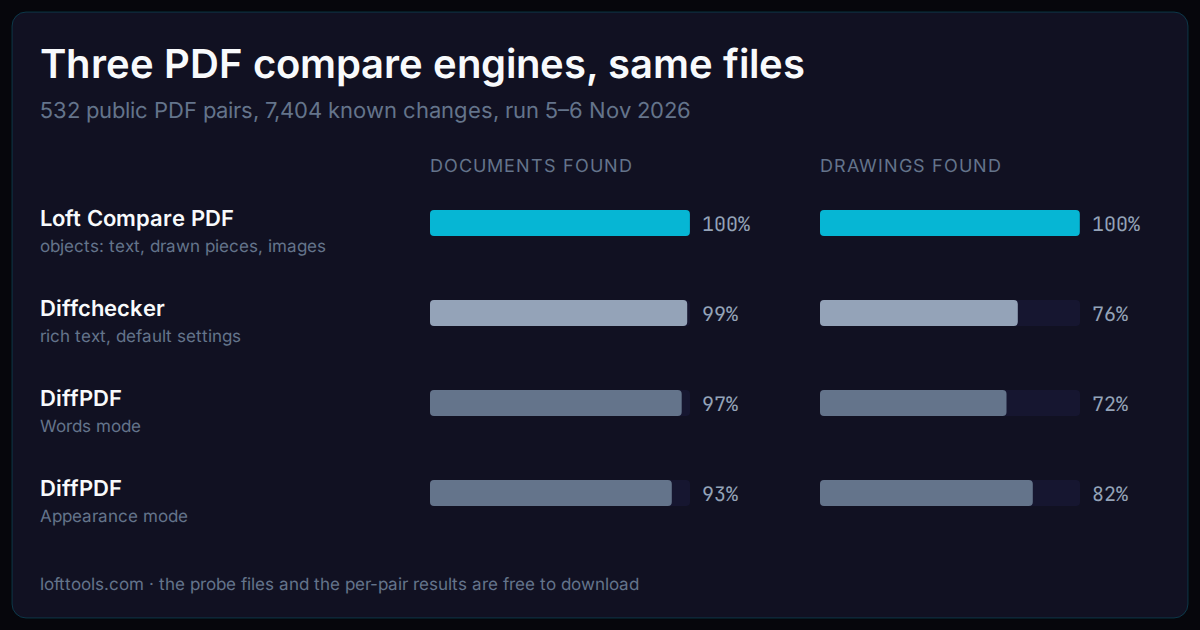
A PDF compare engine reads two versions of a file and lists what changed. Engines differ most in what they read: the words, the rendered pixels, or the objects on the page. We ran three engines on the same 532 public PDF pairs and 93 one-change test files. On documents they come close. On drawings they do not.
We build one of the three, Loft Compare PDF. Read this as our test; its limits are stated at the end. The test files and the per-pair results are free to download, so you can check any number here. The last sections say how to test each engine yourself.
|
Loft Compare PDF |
Diffchecker |
DiffPDF |
| What it reads |
Text, drawn pieces and pictures as objects |
Text (rich text view); pixels per page (image view) |
Text (Words mode); pixels (Appearance mode) |
| Documents: known changes found |
100% |
99% |
97% (Words) |
| Drawings: known changes found |
100% |
76% |
72% (Words), 82% (Appearance) |
| Pages paired by content |
Yes, drawing sheets too |
By text |
No, page 1 with page 1 |
| Typical time per pair in this test |
4 s |
1.3 s |
0.13 s |
| Where it runs |
In the browser |
Browser or desktop app |
Desktop (Linux build tested) |
What did we test?
- 93 probes. Each is a pair of small PDFs with one known change, built to test one ability: a value edited, a line made heavier, a picture recoloured, a page inserted, white text added, a drawing scaled. A few probes change the file and nothing a reader sees, to check that an engine stays quiet.
- 532 public pairs. Real revisions of research papers, contracts, government and medical documents, schematics, circuit-board sets, flex-circuit drawings and architectural sheets: 225 document pairs with 4,147 known changes, and 307 drawing pairs with 3,257.
Each known change was marked in our own review sessions, against the rendered pages. A change counts as found when one of the engine’s rows covers it on the page.
The engines, run from 5 to 7 November 2026, all at their default settings:
- Loft Compare PDF, the engine the browser app runs, on the same computer.
- Diffchecker Desktop 7.3.4 for Linux, on a Pro account, in its rich text view (the default) and its image view.
- DiffPDF 2.1.3, the free Linux build, in its Words and Appearance modes. The paid Windows edition is no longer sold, so we could not test it.
What did each engine find?
On documents the three engines are close: 4,146 of 4,147 known changes for Loft, 4,102 for Diffchecker and 4,014 for DiffPDF Words. In this test, a text differ did well when the change was in the words.
On drawings the gap opens: 3,255 of 3,257 for Loft, 2,478 for Diffchecker, 2,336 for DiffPDF Words and 2,666 for DiffPDF Appearance. Most changes on these drawings are lines, outlines, symbols and pictures, which the text views here did not read.
The probes show why, one ability at a time:
| Ability (probes) |
Loft |
Diffchecker rich text |
Diffchecker image |
DiffPDF Words |
DiffPDF Appearance |
| Text edits, old and new value (10 changes) |
10 |
10, shows the changed characters |
page flagged on 4 of 5 pairs |
10 |
9 places marked |
| Line weight, dashes, colours, a moved vertex (9) |
9 |
0 |
page flagged on 9 |
0 |
9 places marked |
| Pictures replaced, recoloured or masked (5) |
5 |
0 |
page flagged on 5 |
0 |
5 places marked |
| Text colour and grey text (4) |
4 |
0 by default, 4 with formatting on |
page flagged on 4 |
0 |
4 places marked |
| Same drawing scaled, rotated or mirrored (4) |
4 |
0 |
page flagged on 4 |
0 |
4 places marked |
| Page inserted in a document (1) |
found, 2 rows, later pages paired |
1 row, later pages paired |
pages 3 to 5 flagged |
found, 2 extra rows |
found, 46 squares |
| Hidden text: white, invisible, covered (7 pairs) |
listed and marked hidden |
listed as ordinary edits |
0% changed |
listed as ordinary edits |
nothing to see |
| Page rotated, nothing else changed |
1 row |
quiet |
35% of the page changed |
quiet |
146 squares |
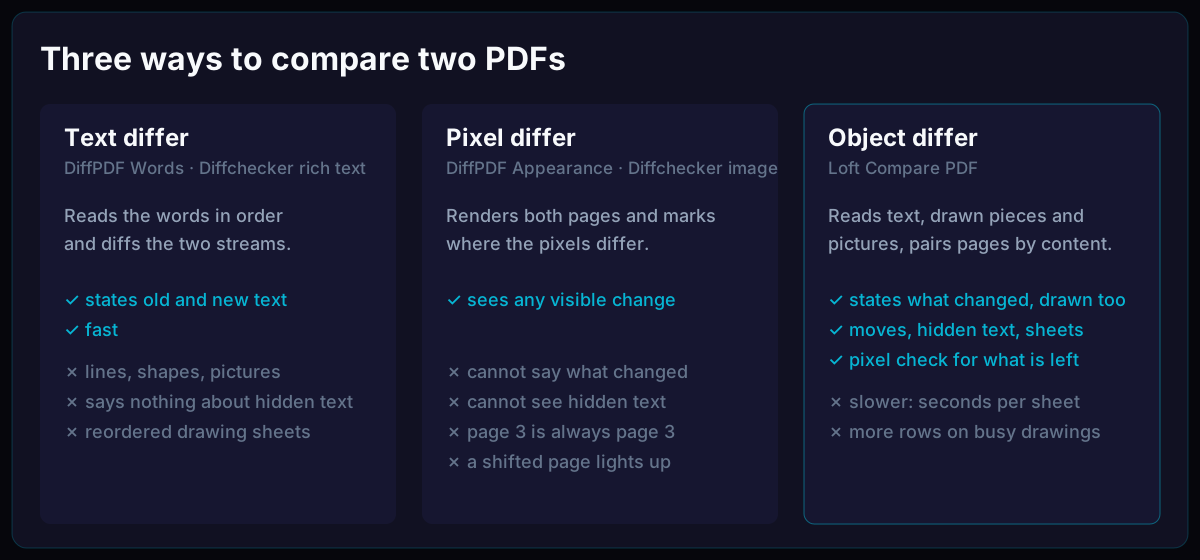
Here the pixel views saw every visible change but did not say what changed. The image view reports a changed percentage per page, and DiffPDF Appearance marks squares; either way you open the page and look. A text view states the change but only when it is in the words.
Who lists the fewest rows?
Finding a change is half the job; the other half is how many rows a reviewer reads to find it. On the 532 public pairs, Loft listed 42,661 rows, Diffchecker 148,686, DiffPDF Words 39,673, and DiffPDF Appearance marked 621,141 squares.
Not every row lands on a marked change. Some rows are true but minor, like a label nudged a little; some are noise. For Loft, 37% of rows sat on no marked change, against 52% for Diffchecker and 56% for DiffPDF Words. On drawings, Loft listed 23,836 rows, DiffPDF Words 19,528 and Diffchecker 116,196. Loft’s rows there include changes to the drawn lines and pictures, which the two text views do not list.
Which engine is fastest?
DiffPDF compares a pair in about a tenth of a second (median 0.13 s in Words mode, 0.24 s in Appearance). Diffchecker took a median of 1.3 s per pair, opening included. Loft took a median of 4 s, and up to 36 s on large drawing sets. It reads every page as objects, then checks the rendered pixels for anything left over. For one contract that is a pause; for a 40-sheet drawing set, it is time spent so that a moved sheet, a changed line or a hidden note is not missed.
How to test each engine yourself
Start with the probe files (2 MB). Each folder holds a.pdf and b.pdf, and the README says what changed. Open each pair in each engine and compare its answer with the README. The per-pair results list every public pair with its known changes, what each engine found and how many rows it listed.
Loft Compare PDF. Open Compare PDF and drop both files. The list gives one row per change with its old and new text; numbers are also gathered in the Values list. For a drawing set, check the pairing view: it shows which sheet was compared with which, and you can pair them yourself. Hidden content (white text, covered text, a layer turned off) is listed with the changes and marked hidden.
Diffchecker. Open its PDF compare on the web or in the desktop app, and add both files.
- Rich text is the default view. A change card shows only the characters that changed: a value edited from 0.172 to 0.173 reads “2 → 3”. Open the page view to read the whole value.
- Formatting changes such as text colour are off by default. Turn them on in its settings before you test them.
- The image view gives a changed percentage per page. In our test it matched pages by number: with a page inserted, every later page read as changed.
DiffPDF. Install it from your Linux distribution’s packages, open both files and press Compare. Words mode is the default; switch to Appearance for drawings. It compares page 1 with page 1, so when a page was inserted, type page ranges in both boxes so the right pages face each other. Appearance marks squares where the pixels differ; zoom in to see what they hold.
The limits of this test
- We built Loft and the test. We marked the known changes in our own review sessions, and we tuned Loft on many of these files. Read Loft’s numbers as its best case. A set of fresh drawing pairs is kept back to measure it without that advantage.
- Default settings. Each engine might do better with its options set for the job, such as Diffchecker’s formatting changes or DiffPDF’s page ranges. We note where an option matters.
- Diffchecker’s OCR view was not run, so its result on scanned pages comes from its rich text view only.
- Timing ran on one computer. Loft ran eight pairs at once in Node. Diffchecker ran one pair at a time in its desktop app. DiffPDF was timed on its compare step only.
If you want to see what Compare PDF shows for your own pair of files, try Compare PDF, or browse more PDF tools at Loft Tools.